Distributed Systems - HPC with SLURM

Intro
I’ve got many years of experience managing production grade distributed systems and container orchestration platforms like Kubernetes and DC/OS and recently started to be curious about how High Performance Computing (HPC) environments work which led me to learning SLURM.
This post documents my journey building a SLURM cluster from scratch as someone completely new to HPC and using it for basic parallel computation tasks.
Understanding SLURM’s Architecture
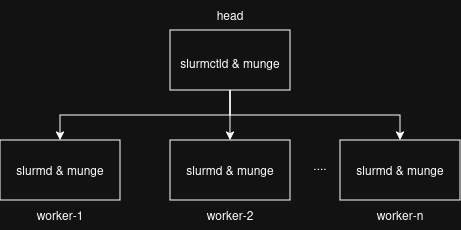
SLURM follows a three-tier architecture pattern:
Control Layer: The decision-making component. This is the slurmctld component on the head node.
Communication Layer: Authentication and messaging. This is the munge component on all the nodes.
Execution Layer: Where work happens. This is the slurmd component on the worker nodes.
The schema bellow shows the very basic architecture without redundancy and historic events storage. It is suitable for a test cluster. A live architecture will look different.
Core Components
slurmctld - The controller daemon that runs on the head node. It handles job scheduling, resource management, and maintains cluster state. Think of it as the central brain making all orchestration decisions.
slurmd - The daemon running on each compute node. It reports node status, executes assigned jobs, and manages local resources.
munge - The authentication service ensuring secure communication between nodes. It uses a shared symmetric key across the cluster.
This centralized architecture is straightforward - one controller makes decisions, workers report status and execute commands.
A Reproducible Environment
I wanted to build something that I and others who are interested could:
Tear down and rebuild quickly without the need to jump on the VMs and install things manually
Version control completely
Configure for different resource constraints
Use to learn SLURM hands-on whenever needed without keeping an always on cluster
I had some doubts (or analysis paralysis) in the beginning about the approach I should take on technology and design. Should I use Docker, Virtualbox or something else. Then the analysis showed that KVM is the most performant virtualization technology on Linux. Also I remembered about my past experience with Vagrant automation. So here are the choices:
Vagrantfile for VM provisioning
Shell scripts for preparing the Vagrantfile
Environment variables for worker count and resources dynamic setting that fits other host computers
Prerequisites
A modern laptop supporting virtualization. Any hardware configuration will work due to the dynamic configuration in Vagrantfile but the values must be adapted to the hardware you have for it to work.
Debian 12 on my host machine (my laptop)
Vagrant + libvirt for VM management on my host machine (my laptop)
Configuration: slurm.conf
The main configuration file is /etc/slurm/slurm.conf. I kept it minimal.
Bellow you can see how a configuration for 1 head with 3 worker nodes looks like:
vagrant@head:~$ cat /etc/slurm/slurm.conf
ClusterName=lab-cluster
SlurmctldHost=head
ProctrackType=proctrack/linuxproc
SlurmctldPidFile=/var/run/slurmctld.pid
SlurmctldPort=6817
SlurmdPidFile=/var/run/slurmd.pid
SlurmdPort=6818
SlurmdSpoolDir=/var/lib/slurm/slurmd
SlurmUser=slurm
StateSaveLocation=/var/lib/slurm/slurmctld
SwitchType=switch/none
TaskPlugin=task/none
MpiDefault=none

# TIMERS
InactiveLimit=0
KillWait=30
MinJobAge=300
SlurmctldTimeout=120
SlurmdTimeout=300
Waittime=0

# SCHEDULING
SchedulerType=sched/backfill
SelectType=select/cons_tres
SelectTypeParameters=CR_Core

# LOGGING AND ACCOUNTING
AccountingStorageType=accounting_storage/none
JobCompType=jobcomp/none
JobAcctGatherFrequency=30
JobAcctGatherType=jobacct_gather/none
SlurmctldDebug=info
SlurmctldLogFile=/var/log/slurm/slurmctld.log
SlurmdDebug=info
SlurmdLogFile=/var/log/slurm/slurmd.log

# COMPUTE NODES
NodeName=worker-[1-3] CPUs=1 RealMemory=1800 State=UNKNOWN
PartitionName=compute Nodes=worker-[1-3] Default=YES MaxTime=INFINITE State=UP
The range notation [1-3] is elegant - it defines all workers in one line.
Partitions
Partitions are logical groupings of nodes. In my simple setup I have one partition containing all workers.
In production environments, one might have:
Different hardware types (GPU nodes, high-memory nodes)
Different job priorities or time limits
Separate environments for different user groups
PartitionName=compute Nodes=worker-[1-3] Default=YES MaxTime=INFINITE State=UPProvisioning with Vagrant
This lets me adjust cluster size for available resources:
# Small cluster for with 1 head and 3 workers
export WORKER_COUNT=3
vagrant up --provider=libvirt
The provisioning handles:
Package installation (slurmctld, slurmd, munge, python3)
munge key distribution
Dynamic slurm.conf generation on all the members of the cluster
/etc/hosts file generation on all the members of the cluster
Vagrantfile network configuration
Service startup
Authentication: Munge
Munge provides authentication using a shared symmetric key. The setup is simple:
Generate one key file:
dd if=/dev/urandom bs=1 count=1024 > munge.keyCopy it to all nodes:
/etc/munge/munge.keyStart the munge service on all nodes
Every node has the same key, so they can verify each other’s identity.
Running Jobs
The jobs are executed from the head machine.
Simple Command Execution
vagrant ssh head
$ srun -N3 hostname

# Expected output
vagrant@head:~$ srun --nodes=3 hostname
worker-3
worker-2
worker-1
This executes hostname on 3 nodes and returns the results.
Batch Job Submission
cat script.sh

#!/bin/bash
#SBATCH --job-name=multijob             ### Name of the job
#SBATCH --nodes=3                       ### Number of Nodes
#SBATCH --ntasks=3                      ### Number of Tasks
#SBATCH --cpus-per-task=1               ### Number of Tasks per CPU
#SBATCH --output=%x_%j.out              ### Slurm Output file, %x is job name, %j is job id
#SBATCH --error=%x_%j.err               ### Slurm Error file, %x is job name, %j is job id

### Runs the script `mynumpy.py` in parallel with distinct inputs and ensures synchronization
srun --nodes=1 --ntasks=1 python mynumpy.py 1 100000000 &
srun --nodes=1 --ntasks=1 python mynumpy.py 100000001 200000000 &
srun --nodes=1 --ntasks=1 python mynumpy.py 200000001 300000000 &
wait
Submit with:
sbatch script.shThis creates three parallel tasks, each processing a different data range. The & backgrounds them, and wait ensures the script doesn’t complete until all tasks finish.
Job states: PENDING → RUNNING → COMPLETING → COMPLETED
The results of parallel computing done on different nodes are compiled all together into a single one:
vagrant@head:/vagrant$ cat multijob_18.out
Input Range: 1 to 100000000, Sum: 4999999950000000
Input Range: 100000001 to 200000000, Sum: 14999999850000000
Input Range: 200000001 to 300000000, Sum: 24999999750000000
Monitoring Commands
# Cluster overview
sinfo                    # Partition and nodes status
sinfo -N -l              # Detailed nodes listing

# Job management
squeue                   # Current jobs
scontrol show job 123    # Detailed 123 job info
sacct                    # Historical job data if accounting is enabled

# Node details
scontrol show nodes      # Full node information
sdiag                    # Scheduler statistics
These commands provide visibility into cluster state, job status, and resource utilization.
The code
Give it a try at https://github.com/vbrinza/hpc-slurm
Conclusion
Seeing how the parallel jobs computing works was an interesting journey for me. Its a great way to create a mental model of comparison between workload orchestration paradigms.